The Elder Scrolls: Arena メモ:ゲームの開始方法
The Elder Scrolls: Arena の入手
2022/04/27からSteamにて無料配布されています。
store.steampowered.com
ちなみにそれ以前はBethesda Launcherにて無料入手出来ていたが、2022年4月末でBethesda Launcherはサービスを終了することとなった。
bethesda.net
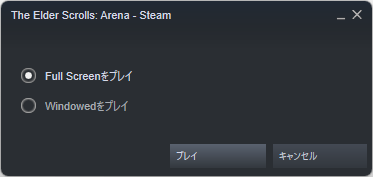
起動時にフルスクリーンかウィンドウ表示かを選べるが、フルスクリーンで起動しても画面を切り替えたりするとウィンドウ表示となる模様。
ゲームを始める前にやること
ゲームをやりやすくするModを導入します。
こちらの記事を参考にさせて頂きました。なのでここではModの簡単な説明とリンクだけ。
tes-mania.com
見やすいフォントに変えるMod
TES Arena ReFonted at The Elder Scrolls: Arena Nexus - Mods and community
キーボードをプレイしやすいキーに変更するMod
TES Arena Remapped at The Elder Scrolls: Arena Nexus - Mods and community
耳障りなサウンドを解消するMod
www.nexusmods.com
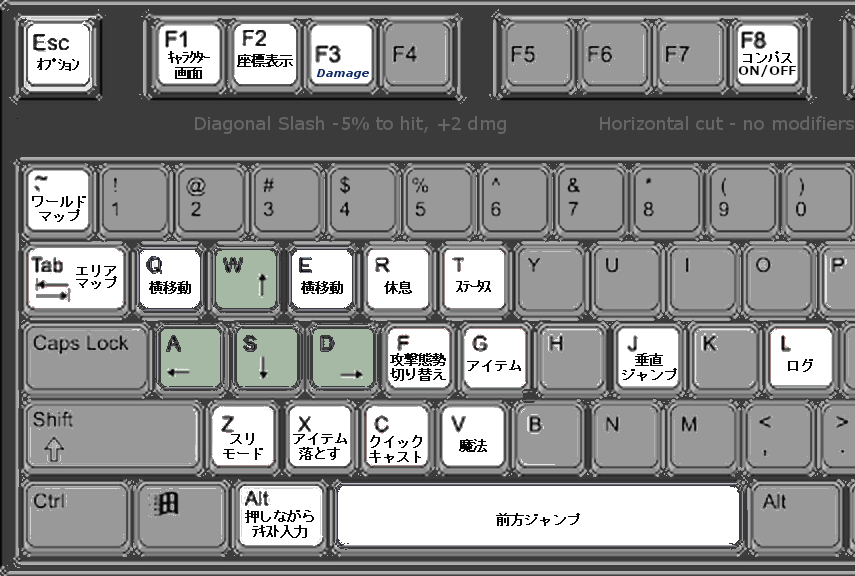
操作方法
ストーリー
画面サイズについて
Bethesda Launcher版とSteam版とでDOSBoxの設定が異なる。
Arenaをインストールしたフォルダに arena.confというファイルがある。
例えば、そのファイルの47行目に [render] というのがあり、次のように違いがある。
Bethesda Launcher版:
frameskip=1
aspect=false
scaler=advinterp3x
Steam版:
frameskip=0
aspect=true
scaler=normal2x
[render]には次のように説明が書かれている。
# frameskip: How many frames DOSBox skips before drawing one.
#    aspect: Do aspect correction, if your output method doesn't support scaling this can slow things down!.
#    scaler: Scaler used to enlarge/enhance low resolution modes. If 'forced' is appended,the scaler will be used even if the result might not be desired.
#            Possible values: none, normal2x, normal3x, advmame2x, advmame3x, advinterp2x, advinterp3x, hq2x, hq3x, 2xsai, super2xsai, supereagle, tv2x, tv3x, rgb2x, rgb3x, scan2x, scan3x.
# frameskip: DOSBox が何フレームスキップしてから描画するか。
# aspect: アスペクト補正を行います。出力メソッドがスケーリングをサポートしていない場合、処理が遅くなる可能性があります!
# scaler: 低解像度モードの拡大/拡張に使用されるスケーラー。forced'が付加されている場合, 望ましくない結果であってもスケーラが使用されます.
# 取りうる値: none, normal2x, normal3x, advmame2x, advmame3x, advinterp2x, advinterp3x, hq2x, hq3x, 2xsai, super2xsai, supereagle, tv2x, tv3x, rgb2x, rgb3x, scan2x, scan3x.
その他違う点がいくつかあるが、詳細はまだ確認できていないのでおいおい確認する予定。
